 Equipe ECODE10.COM

Phishing Campaign Targets WhatsApp Accounts
Researchers at Gen Digital Inc. (a global cybersec

Researchers at Gen Digital Inc., a global cybersecurity software company, have issued a warning about a phishing campaign that aims to deceive users into linking malicious devices to their WhatsApp accounts.
The attack begins with an unsolicited message that reads, “Hey, I just found your photo!” accompanied by a link to a spoofed Facebook login page. Contrary to the intention of stealing users’ Facebook credentials, the attackers are attempting to gain access to their WhatsApp accounts.
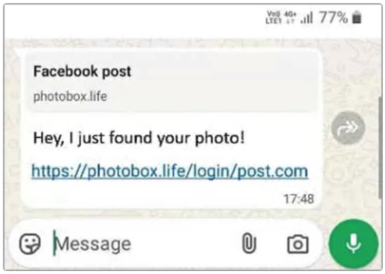
Why does this scam work?
This phishing page serves two primary purposes. Firstly, it establishes a sense of familiarity, encouraging users to trust the page. People are accustomed to Facebook occasionally requesting confirmation from time to time. Seeing a login button or a verification step feels normal and expected.
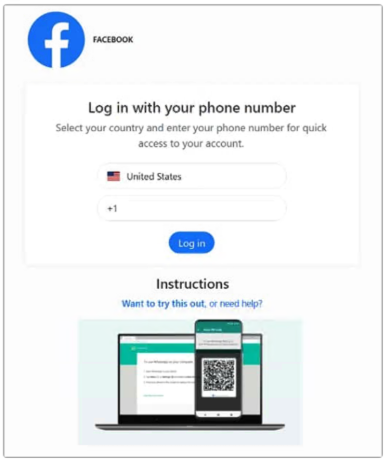
Secondly, it functions as the attacker’s control panel. The page does not directly connect with Facebook but instead acts as an intermediary between the victim and the legitimate WhatsApp Web infrastructure that the attacker is exploiting.
What happens next?
The phishing page either displays a QR code or prompts the user to enter their phone number. The attack proceeds as follows:
-
The victim inputs their phone number on the fake page.
-
The page forwards this number to WhatsApp’s legitimate “link device via phone number” feature.
-
WhatsApp generates a pairing code that is intended to be seen only by the account owner.
-
The attacker’s site captures this code and displays it back to the victim with text suggesting that they should “enter this in WhatsApp to confirm the login and see the photo.”
-
The victim opens WhatsApp, encounters the pairing prompt, and enters the code, believing they are completing a security check.
-
Once the malicious device is successfully paired, the attacker gains full access to the victim’s WhatsApp account and can send additional phishing messages to their contacts.
What can you do to protect yourself?
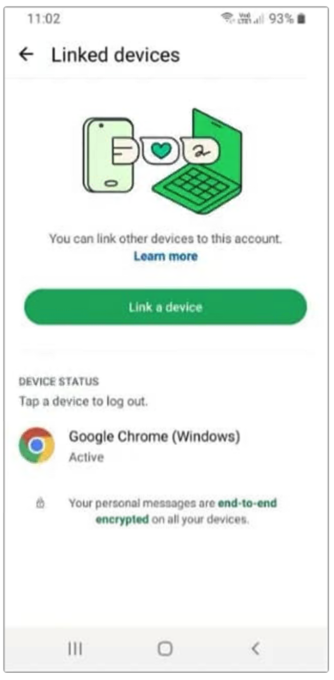
For individuals, the most important actions are simple and do not require technical knowledge.
Check which devices are currently linked to your WhatsApp account.
-
Open WhatsApp.
-
Go to Settings ? Linked Devices.
-
Review the list of active sessions and log out of anything you do not recognize.
Doing this once will remove any sessions already created by this sort of scam. Doing it periodically helps catch future problems earlier.
It is important to always think before you click so that you can protect yourself and your organization from cyberattacks.
Sources: KnowBe4 Blog; Gen Blogs
Related articles

The cost of a free prize, scam
Imagine receiving an unexpected email from a w...
Lock your screen, why?
Your computer screen
What is multi-factor authentication?
Multi-factor authentication (often called MFA)...

Your Reward Points Are Expiring
Recent warnings from the Federal Trade Commission

The scam offer
You receive a text message claiming that you can..

The most commonly used passwords in 2025 and 2026
The most commonly used (and easily hacked) pass...

Can you please tell me where I can check the security headers of my website? Also, why is it crucial to have an A+ rating
Checking your website’s security headers is pretty

Generate TOTP authentication and validate
To generate a QR code for a Time-Based One-Time

AI-Powered Hacking: Automated Exploits
What is it? How to protect myself

What exactly is a content security policy, and how can I incorporate it into my website
Try to understand and follow